/uses
Everything I use to build things, break things, and occasionally fix them again.
A running list of the hardware, software, and services I actually use day-to-day. Inspired by the uses.tech community - a collection of developers publishing their setups. Want to know what I'm up to right now? Check out my /now page.
Hardware
I build servers and infrastructure for a living - buying a box-store desktop was never on the table. Custom-built around an AMD Ryzen 7 3700X (8-core, 16-thread) in an NZXT H510i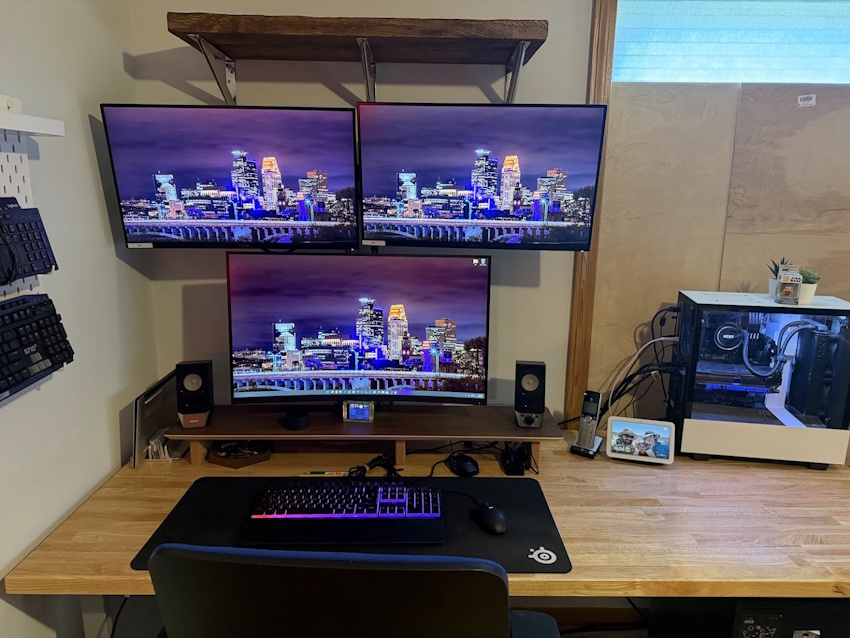 , liquid-cooled with a Kraken M22. 64GB DDR4, RTX 2070 Super. Storage runs a 500GB NVMe boot drive, two 2TB Samsung SSDs split between games and a dedicated dev drive, and a 2TB FireCuda SSHD for archive overflow. Enough horsepower to run VMs, games, and VS Code simultaneously - all without complaint. Which is saying something for a build that's now pushing 6+ years old.
- NZXT H510i - Compact ATX PC Gaming Case
- MSI MPG X570 Gaming Plus Motherboard
- 64GB G.SKILL RipjawsV Series DDR4 RAM
- AMD Ryzen 7 3700X 8-Core, 16-Thread
- EVGA GeForce RTX 2070 Super XC Ultra+
- NZXT Kraken M22
- EVGA 750 G5, 80 Plus Gold 750W, Fully Modular PSU
- 500GB Boot Samsung 970 EVO Plus SSD
- 2TB SAMSUNG 870 QVO SATA III SSD
- Seagate FireCuda 2TB Solid State Hybrid Drive Performance SSHD
A retired workstation-class laptop that found a second life as my family Plex Media Server running Ubuntu Linux 24.04.4 LTS. The M4800 is a tank - it's quad-core i7, Quadro GPU, built for punishment - which makes it a perfectly capable media server that just runs and doesn't complain.
Employer-issued, fully kitted with the ARM processor - and it rocks. Fast, capable, and nearly all the early ARM compatibility quirks are ironed out at this point. It started on rocky ground, but quickly earned its place as one of my favorite machines. Handles the full corporate stack - Teams calls, Office 365, the usual rhythm of meetings and shared drives - and does all of it without breaking a sweat.
Apple Silicon done right. The M1 Pro in the 16" chassis is a genuinely impressive machine - fast, cool, and the battery life is almost offensive compared to what came before it. Kept in rotation as a secondary dev and cross-platform testing box, useful for catching macOS and Safari behavior that Windows won't surface, and for building and testing Intune packages destined for our Mac fleet. It's hard to complain about having to test on this one - it was my daily driver before the Surface Laptop took over.
One 32" MSI MAG321CQR curved gaming display as the primary display, with two 27" Dell UltraSharp U2715H panels on top. The Dells are excellent for work and code and file transfer monitoring; the MSI handles games and gets the center spot because it earned it. Super underrated display that just can't stop giving!
Membrane, not mechanical. I know, I know. It's quiet, comfortable, and doesn't announce every keystroke to everyone within a 10-foot radius. No regrets.
FANTECH ARIA XD7 wireless for general use - It's light, responsive, no cable drag. Logitech G600 MMO (12 side buttons) when playing MMOs and convincing myself that more buttons will make me meaningfully better at them. It's old, I'm old, we're a match made in oldness.
Edifier R19BT Bluetooth speakers for music and ambient listening - good sound for the price. Plantronics Blackwire C3210 wired headset for calls, because wireless headsets and Teams calls have a complicated relationship. and USB just works better. Nothing fancy, and light on my old dusty dome for hours of use.
Twin UPLIFT desks - an 80"x30" fixed-height O-Leg table as the primary surface and a 60"x30" V2 Commercial standing desk alongside it for work. UPLIFT build quality is excellent. The real question is whether the standing desk gets used or just raised to reach something on a shelf. Its for work, and yes it gets used.
Govee floor lamp for ambient fill, a NEEWER GL1 Pro 15.5" LED key light for calls that require looking like a functional adult (hopefully I have clothes on), and a Xiaomi monitor light bar to keep the screen well-lit without reflections bouncing back into the display for late night work when required.
Logitech C920x HD Pro webcam. It works, autofocuses without drama, and hasn't needed replacing - which is about as much as you can ask from a webcam.
Steelcase Amia. If you spend as many hours at a desk as I do, a good chair is not optional - it's infrastructure. The Amia's LiveBack technology flexes with your spine rather than fighting it, and the build quality is exactly what you'd expect from Steelcase: built to last longer than most careers. Genuinely the best thing I've added to my office.
Software & Tools
Primary editor. Extensions for PHP, Git, and very little else. The tool that gets out of the way.
AI pair programmer - runs directly in the terminal inside VS Code. Used for everything on this site. Not a code generator; a thinking partner.
Primary shell on Windows. WSL available for anything that needs bash. PowerShell 7+ for scripting.
Every project is version controlled. Private repos on GitHub. Deployed through my own admin portal's deploy tool - diff, promote, roll back - not raw git push.
Daily driver. Chromium-based without the Google, built-in ad and tracker blocking, and DevTools are identical to Chrome. Privacy without having to think about it. Here's how I set mine up.
Long-time companion browser. Been in the rotation for years and it earns its keep - the DevTools are exceptional, the CSS grid and flexbox inspectors in particular are still the best in the business. Speaking of DevTools - if you haven't opened the console on this site yet, you might be missing something.😉
For transfers that the promotion tool doesn't cover. Not glamorous, but reliable.
Local VM lab. Test environments, snapshots, and the occasional disaster recreation.
Services
Shared hosting for everything on chrisbmn.com. 15+ years with the same provider - that kind of loyalty only happens when something works.
Pull zones for static assets. Fast edge delivery at a sane price point.
Managed jointly - Namecheap as registrar, MDDHosting for the actual zone records.
Private repos for all active projects. The history of every dumb decision, preserved forever.
Via cPanel AutoSSL. Free, automatic, renews itself. There's no reason not to.
Google Tag Manager for tag management. Microsoft Clarity for heatmaps and session recordings. Plus a self-hosted Matomo instance, so I own at least some of my own numbers. All blocked by ad blockers - acknowledged, not a problem.
Uptime monitoring, blacklist checks, and the public status page at status.chrisbmn.com. Honestly one of the best-kept secrets in monitoring - their free tier is ridiculously generous, it just works, and it tells me something's down before anyone else does. If you run anything on the internet, give HetrixTools a look. (That's an affiliate link - but I'd recommend them either way.)
A free-tier Oracle Cloud VM running a Tor onion service, so chrisbmn.com is reachable from the dark side too. Mostly because I could. 🧅
Daily Drivers
Quick capture - links, snippets, reminders. Not fancy, but always open.
Non-negotiable for anyone with opinions about security. 1Password handles everything - unique passwords, TOTP codes, secure notes. If you're not using a password manager, that's a conversation we need to have.
Primary async comms for USMG. Also where too many hours go.
Always on while working. Metal for debugging, ambient for documentation.
See also: Colophon - how this site itself is built.