Install VMWare Tools on Windows Server 2012 R2 Core
Windows Server Core is an installation option for Windows Server 2012 R2. It installs fewer components and administrations options than the full installation of Windows Server 2012 R2. You manage Server Core locally by using Windows PowerShell or a command-line interface, rather than using GUI-based tools. So, where do you click, to install the VMWare tools? Short answer is: You don't..
If you do the normal, right click on your VM, Guest, Install/Upgrade VMWare Tools,
something interesting happens.. 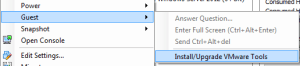 Nothing.. That's right, nothing happens..
So how do you install the tools?
It's actually easier than you'd think. We use command line. I know, scary stuff.. Just 1 simple command, and a reboot.
First, change to your CD drive. Probably "D:\". Then Execute setup64.exe.
Nothing.. That's right, nothing happens..
So how do you install the tools?
It's actually easier than you'd think. We use command line. I know, scary stuff.. Just 1 simple command, and a reboot.
First, change to your CD drive. Probably "D:\". Then Execute setup64.exe.
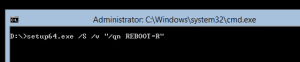 Lets step through what the parameters of this command are doing.
/S = telling the script to run Silent
/v = passes the parameters to the msi directly
/qn = does a silent install
REBOOT = R (This one is more of a preference. - "F" here will Alway Prompt for a reboot, and if ignored, will auto reboot, "S" will Suppress the auto reboot, and prompt, and finally, "R" ReallySuppress, won't prompt at all. )
If you choose to Suppress the auto-reboot, you can always issue the following command to reboot server core.
Lets step through what the parameters of this command are doing.
/S = telling the script to run Silent
/v = passes the parameters to the msi directly
/qn = does a silent install
REBOOT = R (This one is more of a preference. - "F" here will Alway Prompt for a reboot, and if ignored, will auto reboot, "S" will Suppress the auto reboot, and prompt, and finally, "R" ReallySuppress, won't prompt at all. )
If you choose to Suppress the auto-reboot, you can always issue the following command to reboot server core.
 This command, simply sends the shutdown command, with the -r (reboot) and the -t (time = 1) parameters. You can leave the -t off, if you like, and the system will reboot within 1 minute.
Nothing.. That's right, nothing happens..
So how do you install the tools?
It's actually easier than you'd think. We use command line. I know, scary stuff.. Just 1 simple command, and a reboot.
First, change to your CD drive. Probably "D:\". Then Execute setup64.exe.
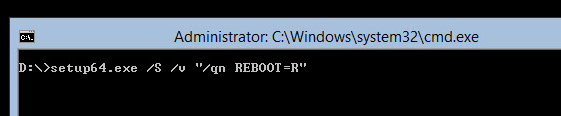 Lets step through what the parameters of this command are doing.
/S = telling the script to run Silent
/v = passes the parameters to the msi directly
/qn = does a silent install
REBOOT = R (This one is more of a preference. - "F" here will Alway Prompt for a reboot, and if ignored, will auto reboot, "S" will Suppress the auto reboot, and prompt, and finally, "R" ReallySuppress, won't prompt at all. )
If you choose to Suppress the auto-reboot, you can always issue the following command to reboot server core.
Lets step through what the parameters of this command are doing.
/S = telling the script to run Silent
/v = passes the parameters to the msi directly
/qn = does a silent install
REBOOT = R (This one is more of a preference. - "F" here will Alway Prompt for a reboot, and if ignored, will auto reboot, "S" will Suppress the auto reboot, and prompt, and finally, "R" ReallySuppress, won't prompt at all. )
If you choose to Suppress the auto-reboot, you can always issue the following command to reboot server core.
 This command, simply sends the shutdown command, with the -r (reboot) and the -t (time = 1) parameters. You can leave the -t off, if you like, and the system will reboot within 1 minute.
Tags:
0 Comments
Leave a Comment